This has been known for a very long time.
I reported the same issue above. Would like it if the notification totaled the amount produced. But people really don’t want oodles of NOTS when they have lots of bases and buildings. So kind of a feature for them right now. 
Maybe you could customize it?
Improvement: Commodities orders need to either expire, or require a recurring listing cost.
This will improve volatility in the market, as well as encourage more use of the local market bulk orders.
When trying to create a new production order I get a window pop up that says “Component failed to render”. So I am unable to produce anything. It has popped up since the latest update.
I have tried both refreshing and logging out and back in with no change.
Cheers
Beercloud
I have just tried to reproduce the issue with your account but it worked for me. Could you tell me which browser you use to play PrUn?
Opera.
Sounds like a setting in the browser might be hanging it up then. When I get a free minute I’ll go hunting and get back to you.
None of the combos of turning stuff on or off in the browser worked. But I did find that it is not in the browser.
I opened the game up on our other computer that has Opera as its browser and it worked fine. So Im thinking it might be a computer security setting. I’ll start working on that and if I can find it I’ll get back with you so you can make noted of it.
@Beercloud If you have the time, could you try again on the computer where it didn’t work and post the error message in the console? On Opera that should be CTRL-SHIFT-I.
k will be able to do that tomorrow night.
molp, I posted the error message on the console as described. Dont know what to do with it from that point. I’ll try to leave apex open as long as i can through the day. I couldnt figure out how to copy & paste it here. I can do it the old fashion way if need be.
Thanks, if you want you can just take a screenshot and paste it into a reply here
I tried that but it wont let me get paste the game border. I do see in the top right corner that there is 1 error of that message.
Here’s a note i saw in the console when i hit ctrl-shift-I
react-dom.production.min.js:209 TypeError: e.flatMap is not a function
at n.value (ProductionLine.jsx:143)
at os (react-dom.production.min.js:212)
at du (react-dom.production.min.js:255)
at t.unstable_runWithPriority (scheduler.production.min.js:19)
at Hi (react-dom.production.min.js:122)
at hu (react-dom.production.min.js:248)
at Qs (react-dom.production.min.js:239)
at react-dom.production.min.js:123
at t.unstable_runWithPriority (scheduler.production.min.js:19)
at Hi (react-dom.production.min.js:122)
1 Like
issue with rig. “component failed to render”
1 Like
Some production queue improvement suggestions:
- Repeat order indefinitely - my Rig should just keep making water, my farms should keep making the same 3 things, etc
- Ability to reorder queue
- Pick next ready order, not just the order at the top if it’s blocked
- After time it takes for the order to be completed, add total time until it’ll be completed (e.g. all orders above it taken into consideration)
K finally figured it out in case others might run across this.
It was in the browser as we suspected. I found that Opera was not automatically updating like it was supposed to so I had an older version. I had to reinstall the newest version overwriting the older version for it to work. Now everything in the game works perfectly.
Hope this helps if anyone else happens to run across this issue.
Cheers
Beercloud
Thanks for the suggestions, we are currently looking into options on this matter.
Thanks for letting us know!
Possible Improvement of UX:
Make it more clear in the Local Market buffer that Trial user need to buy a Pro license to use LM.
At the moment the UI doesn’t tell new users that they can’t do anything at LM. Had the problem myself at first and seeing users asking about it in the chat.
Maybe add a blue banner like in other buffers.
There is this UI bug in the trading menu. In this example I am selling rations:
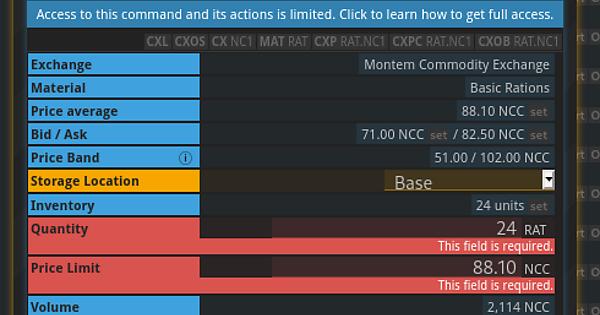
If you click the input fields but don’t fill anything then you get the red error as expected but when you use the “set” buttons to fill the input fields the errors don’t go away.